Seamless CyberSource Payment Integration in IBM Sterling Call Center (Next-Gen)
Executive Summary
A Technical Deep-Dive into Embedding Secure Payment Processing in Enterprise Order Management.
In today’s fast-paced e-commerce landscape, call center agents need frictionless payment processing capabilities that don’t disrupt their workflow. Our team successfully integrated CyberSource Secure Acceptance directly into the IBM Sterling Call Center (Next-Gen) application, enabling agents to process credit card payments without leaving the order management interface.
Key Innovation
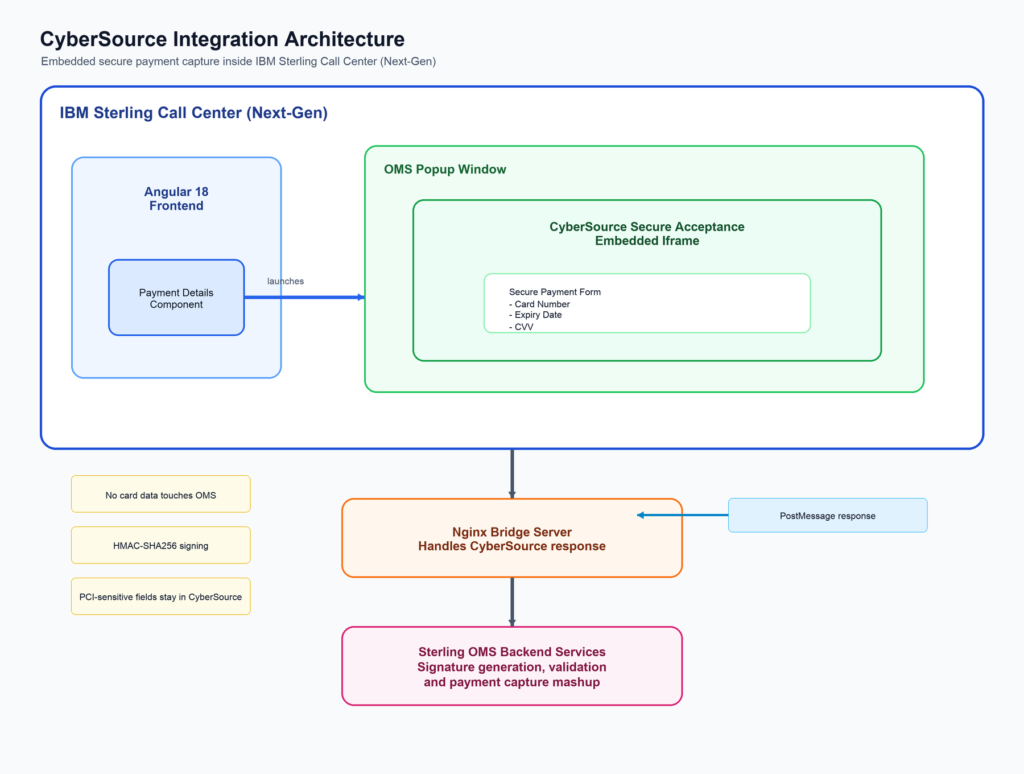
The CyberSource payment iframe is embedded directly within the Call Center popup window, providing a seamless, PCI-compliant payment experience while maintaining complete control over the user interface and data flow.
The Chllenge
Traditional payment integrations often require:
- Redirecting users to external payment pages
- Complex iframe embedding with cross-origin issues
- Manual data entry and reconciliation
- Multiple system hops that slow down order processing
Our goal was to create a single-click payment experience where call center agents could:
- Click “Add Credit Card” within the order confirmation page
- Complete payment in a secure, branded popup
- Have the payment automatically recorded in Sterling OMS
- Continue with order processing without any manual intervention

Architecture Overview
Technology Stack
1. Embedded Iframe Architecture

The most significant aspect of our integration is the direct embedding of CyberSource within the Call Center popup. Unlike traditional approaches that redirect users to external pages, our solution:

- Opens a controlled popup window from the OMS application

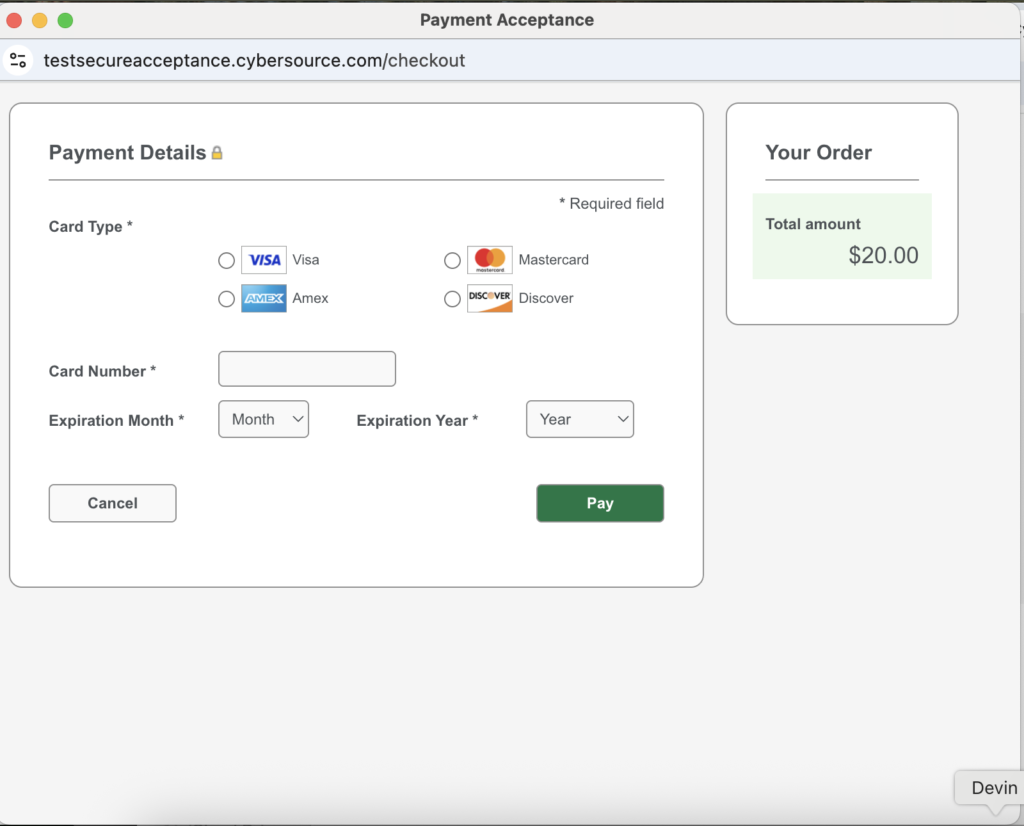
- Embeds the CyberSource Secure Acceptance form as an iframe within the popup

- Maintains OMS branding and control throughout the payment process

- Provides real-time feedback to the agent

```typescript

// Opening the CyberSource popup from payment-details.component.ts

private async openDirectCyberSourcePopup() {

// Extract billing information from existing order

const existingBillingInfo = this.extractBillingInfoFromOrder();


// Generate secure form data with HMAC-SHA256 signature

const formData = await this.generateWorkingFormData(billingData, paymentAmount);

const signature = await this.generateSecureSignature(formData);

formData.signature = signature;


// Create popup window with OMS branding

const popup = window.open('', 'CyberSourcePayment', 'width=800,height=700');


// Embed CyberSource iframe and setup communication

this.createWorkingPopup(formData, popup);

this.setupPopupMessageListener(popup);

}

```

2. Backend-Driven Security

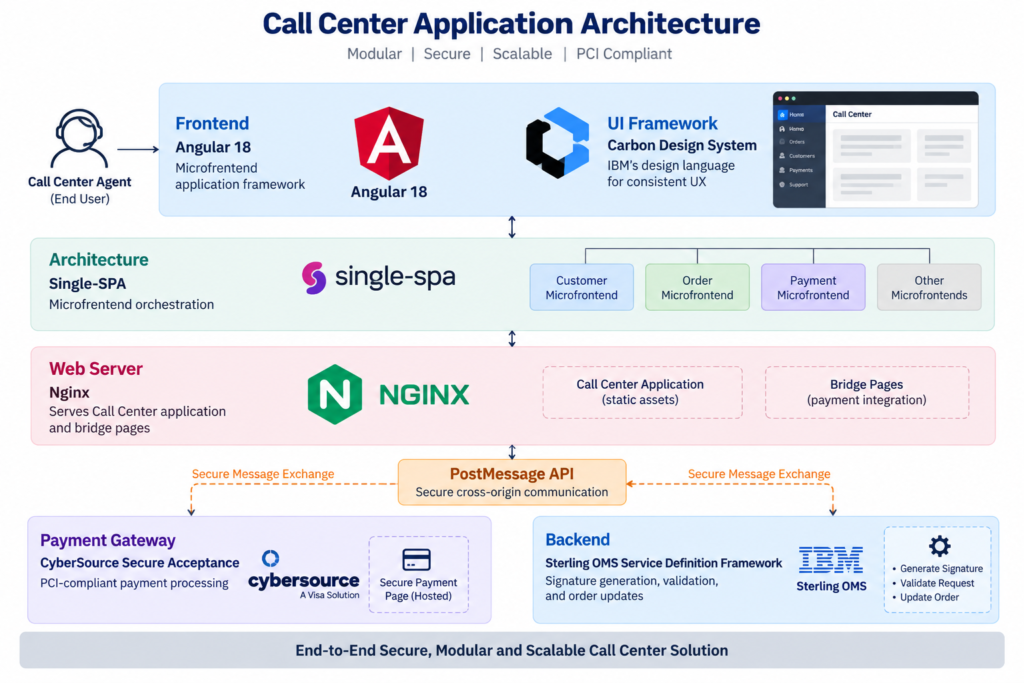
All cryptographic operations are handled by the Sterling OMS Service Definition Framework, ensuring:

- Secret keys never exposed to the frontend

- HMAC-SHA256 signature generation performed server-side

- Response validation to prevent tampering

- PCI compliance maintained throughout

```typescript

// Secure signature generation via backend service

private async generateSecureSignature(formData: any): Promise<string> {

// Fetch credentials from Sterling OMS properties

const [accessKeyResponse, profileIdResponse] = await Promise.all([

this.paymentDataService.getCyberSourceProperty('cybersource_access_key'),

this.paymentDataService.getCyberSourceProperty('cybersource_profile_id')

]);


// Add credentials to form data

formData.access_key = accessKeyResponse.PropertyValue;

formData.profile_id = profileIdResponse.PropertyValue;


// Call secure backend signature generation service

const backendSignatureResponse = await this.paymentDataService.generateCyberSourceSignature(formData);


return backendSignatureResponse.signature;

}

```

3. Nginx Bridge Server

The Nginx server plays a crucial role in handling CyberSource responses:

- Receives payment response from CyberSource

- Parses and validates response parameters

- Communicates back to the OMS popup via PostMessage API

- Provides visual feedback during processing

```html

<!-- cybersource-bridge.html - Nginx-served bridge page -->

<script>

// Extract CyberSource response parameters

const urlParams = new URLSearchParams(window.location.search);

const responseData = {};


for (const [key, value] of urlParams) {

responseData[key] = value;

}


// Send response back to OMS popup window

if (window.opener && !window.opener.closed) {

window.opener.postMessage({

type: 'CYBERSOURCE_RESPONSE',

success: responseData.decision === 'ACCEPT',

data: responseData,

timestamp: new Date().toISOString()

}, '*');

}

</script>

```

4. Real-Time Order Updates

Upon successful payment, the system automatically:

- Validates the CyberSource response signature

- Calls a custom Sterling OMS mashup to record the payment

- Updates the order with payment method and authorization details

- Refreshes the UI to show the new payment

```typescript

// Processing successful payment

async processCyberSourcePaymentSuccess(paymentData: any): Promise<void> {

// Call custom CyberSource mashup via PaymentDataService

const mashupResponse = await this.paymentDataService.processCyberSourcePayment(

this.orderHeaderKey,

paymentData

);


// Refresh payment page with updated data

await this.refreshPaymentPage();


// Show success notification

this.ccNotificationService.notify({

type: 'success',

title: 'Payment Added Successfully',

subtitle: `Credit card payment of ${paymentData.amount} has been added to the order.`

});

}

```

---

The Complete Payment Flow

Step 1: Agent Initiates Payment

The agent clicks "Add Credit Card" on the payment confirmation page. The system validates the payment amount against the remaining order balance.

Step 2: Secure Form Generation

The frontend generates a unique transaction UUID and timestamp, then calls the backend service to:

- Retrieve CyberSource credentials from Sterling OMS properties

- Generate HMAC-SHA256 signature for all form fields

- Return the complete signed form data

Step 3: Popup with Embedded Iframe

A popup window opens with:

- OMS-branded header and styling

- CyberSource Secure Acceptance iframe

- Loading indicators and status messages

Step 4: Payment Processing

The agent (or customer on the phone) enters card details directly in the CyberSource iframe. CyberSource handles all PCI-sensitive data.

Step 5: Response Handling

After payment processing:

- CyberSource redirects to the Nginx bridge server

- Bridge server parses the response and sends it to the OMS popup via PostMessage

- OMS validates the response signature

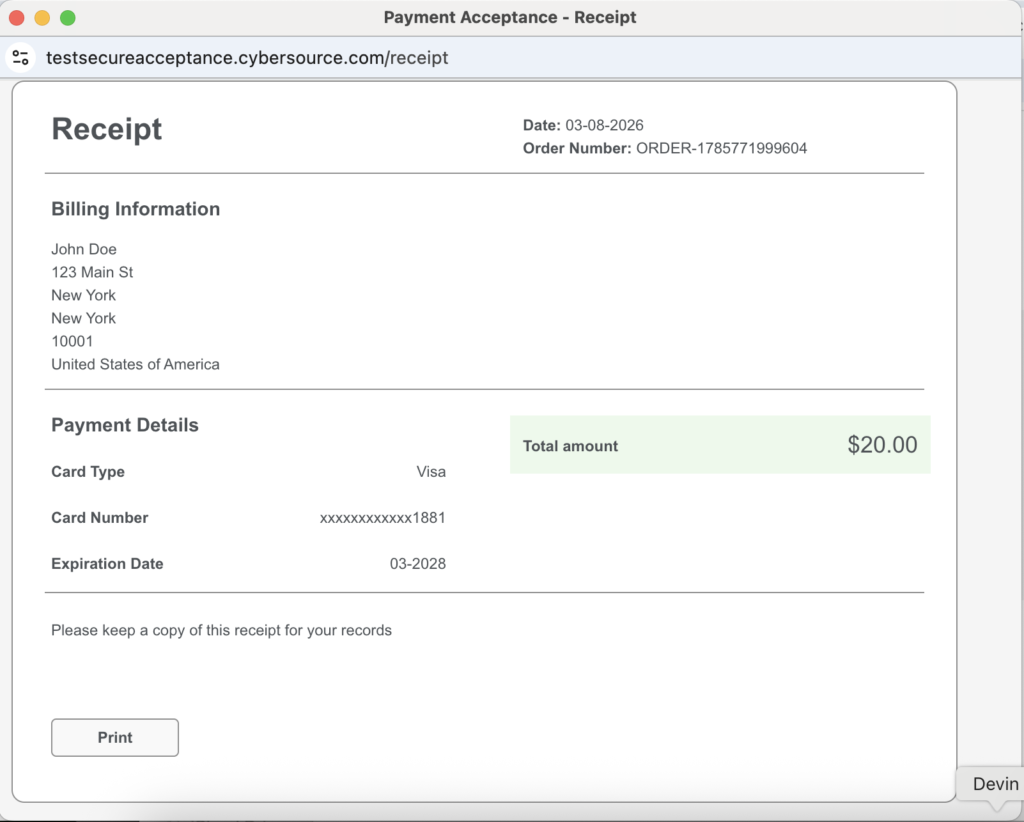
- Success/decline message displayed to the agent

Step 6: Order Update

For successful payments:

- Custom mashup records the payment in Sterling OMS

- Payment method added with authorization details

- UI refreshes to show updated payment status

- Agent can proceed with order confirmation

---

Security Architecture

PCI Compliance

- No card data touches our servers - CyberSource iframe handles all sensitive data

- Tokenization - Card numbers are tokenized by CyberSource

- Secure communication - All data transmitted over HTTPS

Signature Validation

```typescript

// Validating CyberSource response signature

const validationResult = await this.validateCyberSourceSignature(

paymentData,

this.originalCyberSourceSignature

);

if (!validationResult.isValid) {

// SECURITY: Stop processing when signature validation fails

this.ccNotificationService.notify({

type: 'error',

title: 'Payment Security Validation Failed',

subtitle: 'Payment cannot be processed for security reasons.'

});

return;

}

```

Backend Key Management

- CyberSource credentials stored in Sterling OMS properties

- Secret key never exposed to frontend code

- All signature operations performed server-side

---

Handling Edge Cases

Payment Declines

When a payment is declined, the system:

- Displays a professional decline message with reason code

- Provides "Try Again" option for the agent

- Logs decline details for troubleshooting

```typescript

// Handling payment decline

if (event.data.data.decision !== 'ACCEPT') {

const declineData = {

transactionId: paymentData.transaction_id,

reasonCode: paymentData.reason_code,

message: paymentData.message

};


this.showPaymentDeclineMessage(declineData);

}

```

Hybrid Payments

The integration supports hybrid payment scenarios where an order may have:

- CyberSource credit card payment (real-time authorized)

- Other payment methods (check, cash, customer account)

The system intelligently calculates remaining balances and handles both payment types seamlessly.

---

Key Benefits Achieved

For Call Center Agents

- Single-click payment initiation - No navigation away from order screen

- Real-time feedback - Immediate success/decline notifications

- Automatic order updates - No manual data entry required

- Professional UI - Consistent IBM Carbon design throughout

For IT Operations

- PCI compliance maintained - No sensitive data in our systems

- Centralized configuration - Credentials managed in Sterling OMS

- Comprehensive logging - Full audit trail for troubleshooting

- Modular architecture - Easy to maintain and extend

For the Business

- Faster order processing - Reduced time per transaction

- Reduced errors - Automated data flow eliminates manual entry mistakes

- Better customer experience - Agents can focus on customer service

- Scalable solution - Handles high transaction volumes

---

Technical Specifications

CyberSource Configuration

| Parameter | Value |

|-----------|-------|

| Transaction Type | `authorization,create_payment_token` |

| Signature Method | HMAC-SHA256 |

| Locale | en |

| Currency | USD |

Signed Fields (24 fields)

```

access_key, profile_id, transaction_uuid, signed_field_names,

unsigned_field_names, signed_date_time, locale, transaction_type,

reference_number, amount, currency, override_custom_receipt_page,

override_custom_cancel_page, bill_to_address_country, bill_to_forename,

bill_to_surname, bill_to_address_line1, bill_to_address_line2,

bill_to_address_city, bill_to_address_state, bill_to_address_postal_code,

bill_to_email, ignore_avs, ignore_cvn

```

Sterling OMS Integration

| Component | Purpose |

|-----------|---------|

| Custom Mashup | `extn_icc.create-order.cybersource-payment-capture` |

| API | changeOrder with PaymentDetailsList |

| Properties | CyberSource credentials storage |

---

Lessons Learned

1. Signature Field Ordering Matters

CyberSource requires signed fields in a specific order. Any mismatch between the field order in signature generation and form submission results in a 403 error.

2. PostMessage Origin Validation

Always validate the origin of PostMessage events to prevent security vulnerabilities:

```typescript

const allowedOrigins = [window.location.origin, 'http://localhost:8080'];

if (!allowedOrigins.includes(event.origin)) {

return; // Reject messages from unauthorized origins

}

```

3. Window Relationship Management

The browser's `window.opener` relationship is crucial for communication between the popup and main window. This relationship survives page redirects within the popup.

4. Backend Signature Generation is Essential

Moving signature generation to the backend was critical for:

- Security (secret key protection)

- Reliability (consistent HMAC implementation)

- Maintainability (centralized credential management)

---

Future Enhancements
- Multi-currency Support – Extend to support international transactions
- Saved Payment Methods – Allow agents to use previously tokenized cards
- Split Payments – Support multiple credit card payments per order
- Mobile Optimization – Responsive design for tablet-based call centers
---
Conclusion
Integrating CyberSource Secure Acceptance into IBM Sterling Call Center (Next-Gen) demonstrates how enterprise applications can provide seamless, secure payment experiences without compromising on compliance or user experience.
The key to our success was the embedded iframe architecture combined with backend-driven security, allowing us to maintain complete control over the user interface while leveraging CyberSource’s PCI-compliant payment processing.
This integration has significantly improved our call center operations, reducing payment processing time and eliminating manual data entry errors, ultimately leading to better customer satisfaction and operational efficiency.
Spread the knowledge.
Author Details
